|
















| |
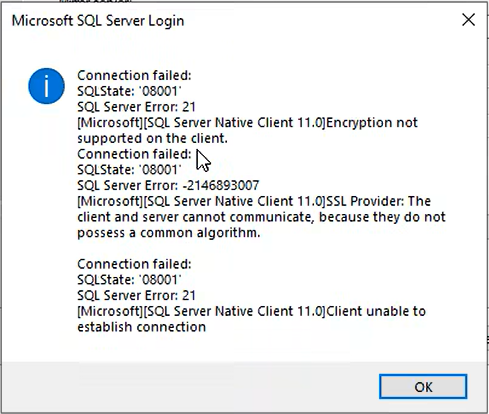
SQL Server Error 21: Encryption not supported on the client.
Applies to:
 | Client/Driver: Applications using SQL Server Native Client 11.0 (SQLNCLI11)
for ODBC/OLE DB connections. |
| Server: Azure SQL Database and/or SQL Server instances configured to require
modern TLS. |
| OS / Security baseline: Windows environments where TLS 1.0 / TLS 1.1 are
disabled. |
| SQL Server 2022: we received this error when executing SSIS packages
configured to connect to a newly installed SQL Server instance. |
Date created: January 26, 2026.
Problem Description.
When connecting to a database server using a
client/application that relies on SQL Server Native Client 11.0, the connection
fails with:
SQL Server Error: 21
[Microsoft][SQL Server Native Client 11.0] Encryption not supported on the
client.
Typical scenarios:
|
SQL Server Integration Services (SSIS) packages using SQL Server Native Client
driver. |
|
Linked server / distributed queries using
SQLNCLI11 |
|
Legacy applications using SNAC 11
|
|
ODBC/OLE DB connection strings referencing “SQL Server Native Client 11.0”
|
Cause.
The failure occurs because the installed SQL
Server Native Client 11.0 build on the client machine does not negotiate TLS 1.2
correctly (or is too old to do so reliably), while the environment is enforcing
stronger protocols:
|
The database server (or Azure SQL)
requires TLS 1.2, and/or |
|
The client OS is configured to disallow
TLS 1.0 and TLS 1.1, leaving TLS 1.2 as the only permitted protocol.
|
As a result, the SSL/TLS handshake cannot
complete and the SNAC 11 client reports: “Encryption not supported on the
client.”
In addition to "SQL Server Error: 21" the
image we shared with the error also shows:
|
SQL Server Error: -2146893007 |
|
[SQL Server Native Client 11.0] SSL
Provider: The client and server cannot communicate, because they do not
possess a common algorithm. |
That second message is the classic symptom of
a TLS / cipher-suite mismatch between the client and server (for example: client
stuck on older TLS or missing modern cipher support; server requires TLS 1.2 and
stronger ciphers). In practice, this commonly happens after TLS 1.0/1.1 are
disabled on the OS or after security hardening, and the installed SQLNCLI11
build is too old to negotiate correctly.
Workaround / Solution
Solution used (what fixed the issue)
Install the latest SQL Server 2012 Native Client – QFE package (SNAC 11
cumulative servicing update) from Microsoft Download Center. Download it from
here.
This specific download is published as the latest cumulative servicing update
for the SQL Server 2012 Feature Pack Native Client.
Implementation steps.
-
On the affected client machine, confirm
the app/provider is SQLNCLI11 (SQL Server Native Client 11.0).
-
Download and install Microsoft SQL
Server 2012 Native Client – QFE from the Microsoft page.
-
Re-test the connection (SSIS connection,
linked server test, application login, UDL test, etc.).
-
If the application is a service (or runs
under IIS/agent), restart the relevant service to ensure it loads the
updated components.
|
![[Company Logo Image]](images/SQLCofee.jpg)


